bedigital loading
Client project · Mobile app

beDigital your business card, in your pocket

An app for making and managing digital business cards. Design your vCard, share it with a QR code or a phone handshake, and keep every customer’s card in one place, grouped, searchable and a reminder away, instead of a drawer of paper.

  • UX · UIResearch to build
  • 88%Of paper cards binned in a week
  • 6Boards of screens
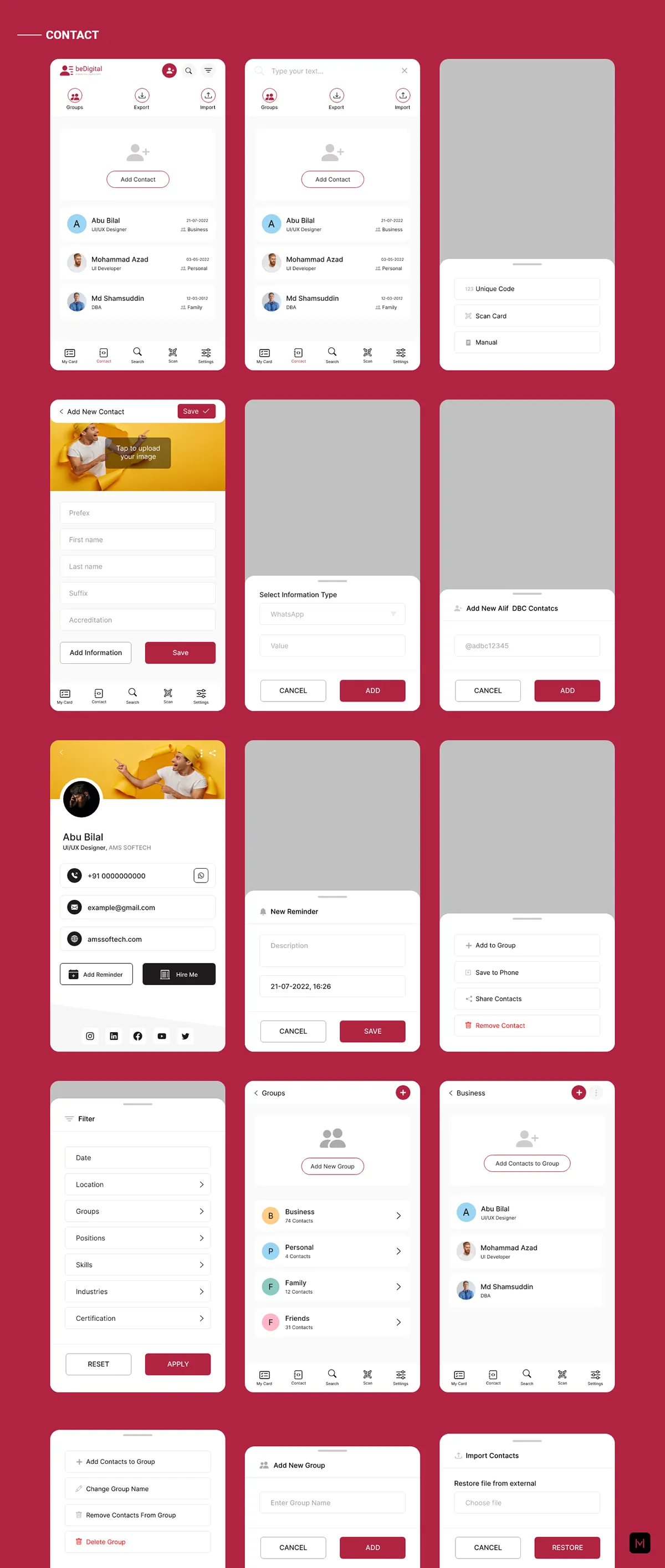
Contacts: the list, adding a contact, groups and filters
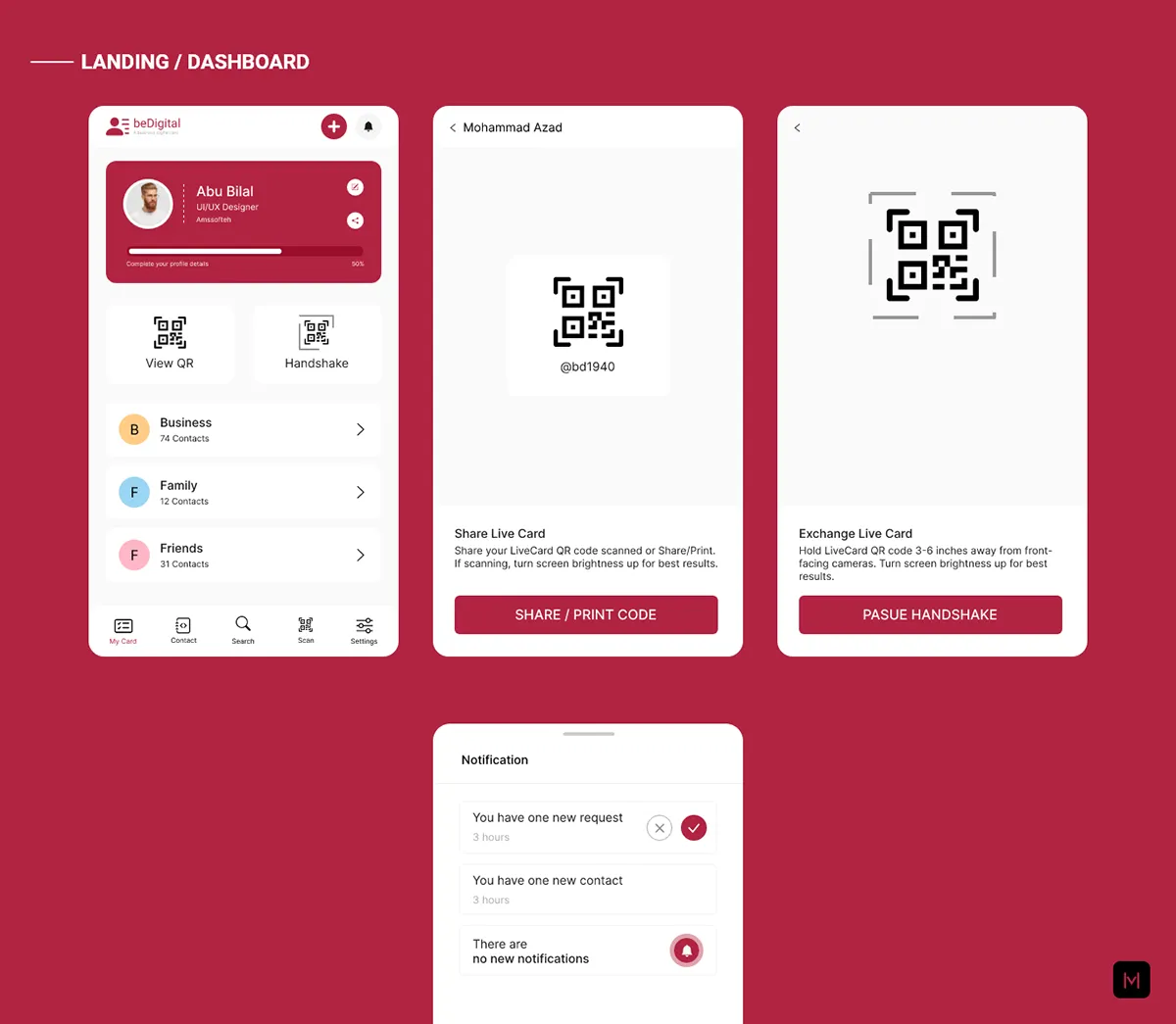
The dashboard: my card, view QR, handshake and contact groups
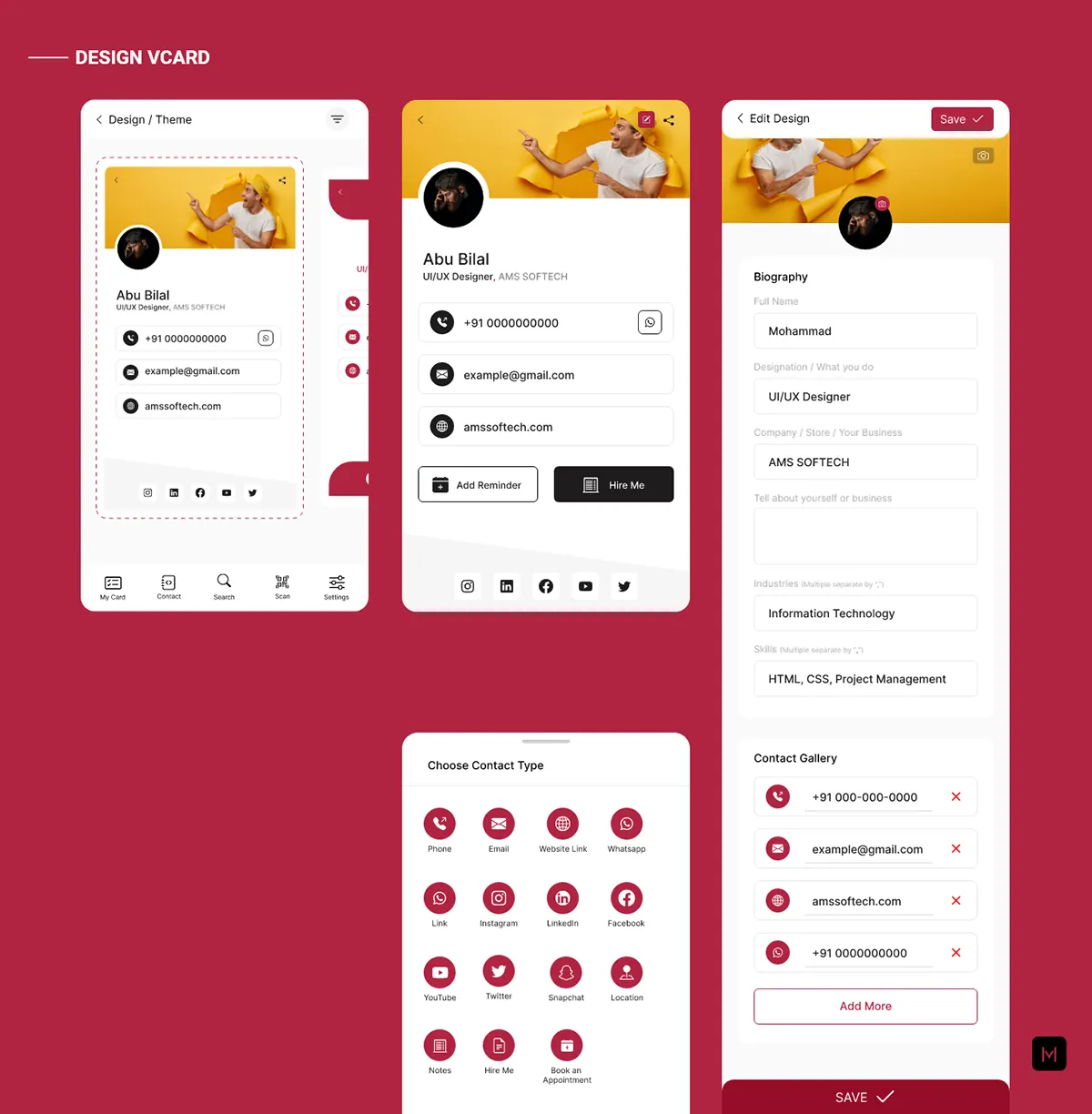
beDigital · Design vCard
Designing a vCard: the theme, the card, its details and the contact types
Overview

From a stack of paper to a card that never runs out

The shift

  1. Thousands of cards a month, and nowhere to keep them
    Every card in one place, grouped and searchable by position, skill or industry
  2. The card you need is never there when you need it
    Find it in seconds, call or message from the card, set a reminder
  3. Room for a name and a number, and reprints for every change
    A designed vCard with links, social and services, changed whenever you like
  4. Handing over paper, after a pandemic
    Shared by QR code or a phone handshake, without touching a thing
My role

  1. 01ResearchPersona, empathy map, user journey, survey
  2. 02UXInformation architecture, user flow, wireframes, brainstorming
  3. 03UI & buildThe brand and the app, designed and developed in Ionic

What we heard

88% of printed cards binned after the first week
80% never save the number from a card
9/10Times the card can’t be found when it’s needed

The survey

  • Prefer a digital vCard70%
  • Use one often92%
  • Expect sharing to change after the pandemic55%

What it does

  • My cardDesign a vCardThemesContact typesBiography
  • ShareQR codePhone handshakePrintScan a card
  • ContactsGroupsSearch by skillRemindersImport & export
  • AccountPasscode & touch IDSecurity questionsInvitesDark mode

Tools & methods

  • Figma
  • Photoshop
  • Ionic
  • HTML
  • Sass
  • npm
Research

Why paper wasn’t working

Professionals and managers collect thousands of cards and can’t find them when it counts. We asked them why, built a persona from what they said, and mapped the app around the moment they need a card.

The goals

One place to create a business vCard and manage every customer’s details: schedule calls, set reminders, take notes and share by handshake or QR, alone or with your team.

  1. Convenience: the card when you need it
  2. Save time with many cards
  3. Flexible: anytime, anywhere
  4. Safe, on a secure server
  5. Cheaper than printing

The journey

  1. Empathize
  2. Define
  3. Ideate
  4. Prototype
  5. Test, and back to ideate

Who we designed for

Abu Bilal 29 · Sales executive · New Delhi · Married

A full-time sales executive who wants more presence for himself and his company, and to keep his customers’ details in order. He collects more cards than he can carry or keep track of.

Frustrations

  • Too many cards to carry
  • Never finds the card when he needs it
  • Rarely saves the number from a card
  • Most cards end up in the bin after a week
  • No room on a card for products and services
  • Printing is expensive

Goals

  • Carry every card easily
  • Find a card when he needs it
  • Keep a large number of cards in order
  • Reach a contact in one tap
  • Show a full list of what he offers
  • Share his details the easiest way

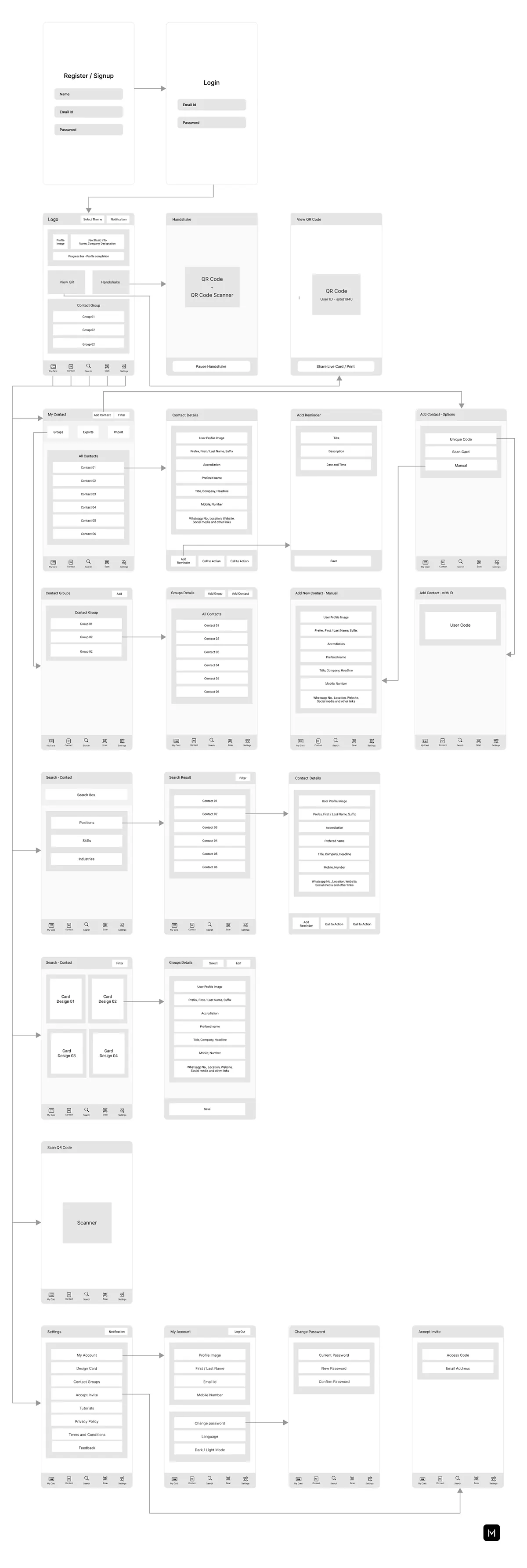
Information architecture

Dashboard
  • My cardDesign cardNotificationView QR codeHandshake
  • ContactGroupsExport & importContact listAdd contactAdd reminder
  • SearchInviteFilter
  • Scan QR
  • SettingsMy accountDesign cardContact groupAccept inviteChange passwordLanguage

User flow & wireframes

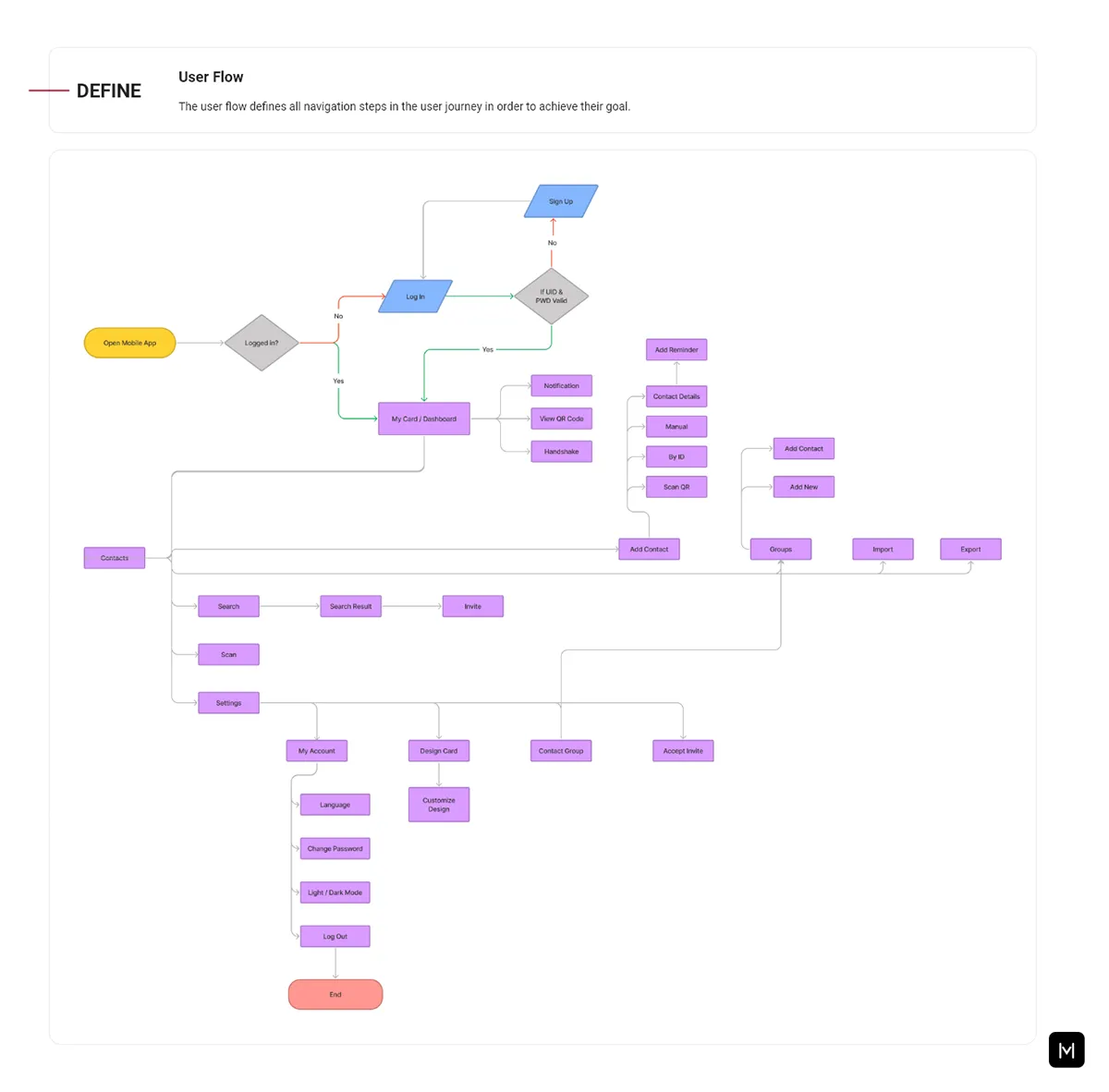
User flow: from opening the app to each feature
Wireframes of every screen, joined by the flow

What I learned

Keep the customer in the room
With deadlines pressing, small workshops on what users want would have brought their voice back into each feature.
A design system needs a keeper
It lasts only with constant reference and someone who champions it, above all when the team changes.
The core

Make a card, hand it over

Pick a design and the details your card shows, choose how to share it, and watch the cards you receive land in your contacts, ready for a reminder. It plays on its own; tap anything and the phone is yours.

Design

Your vCard

Theme

On the card

Share by

AB Abu Bilal Sales Executive · AM Softech
    Scan to save my card

    Received

    Your contacts
    1,284cards shared this month
      6 boards of screens · 3 parts
      1. The dashboard

        Your card and how complete it is, your QR code, the handshake and your contact groups, with notifications on top.

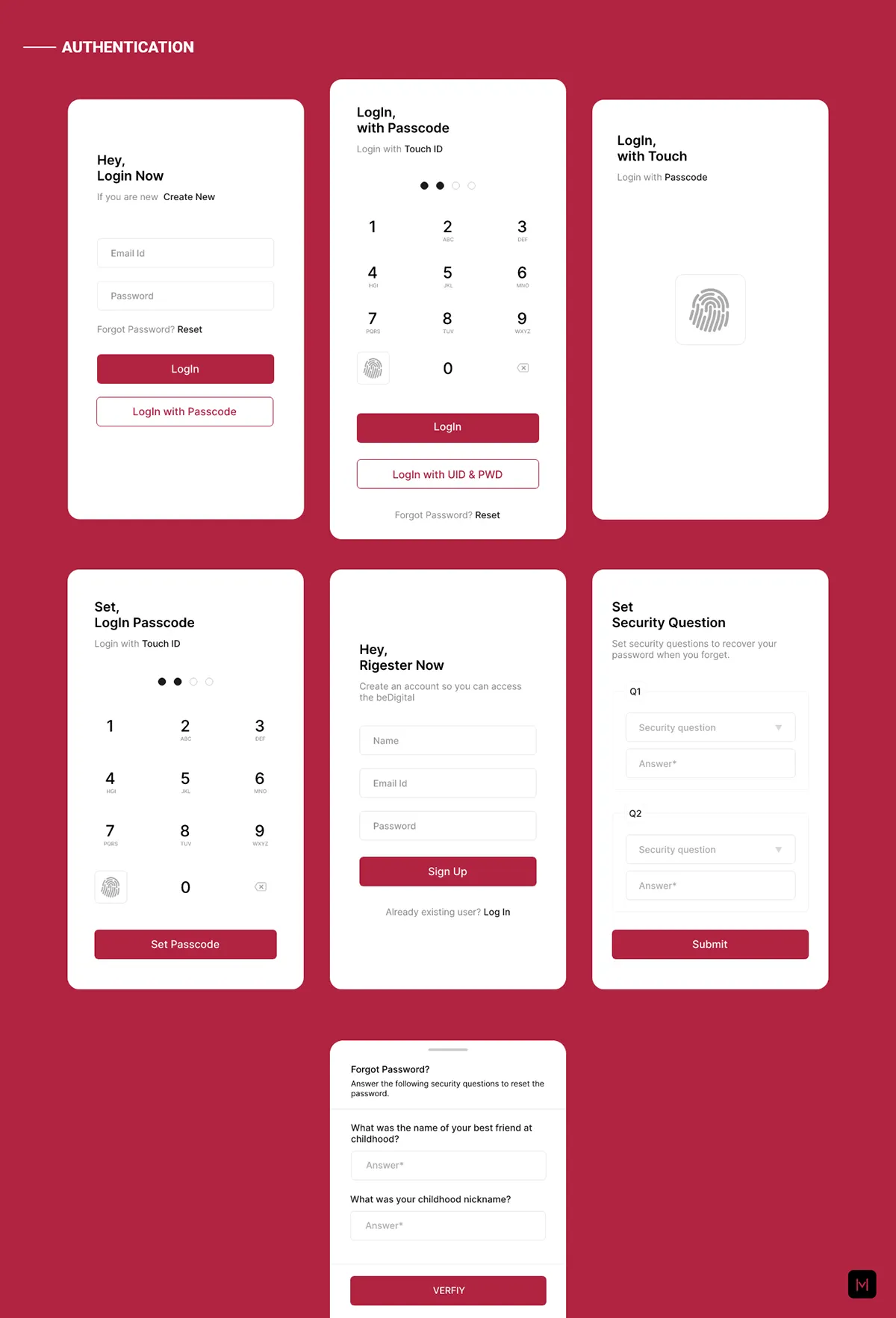
      2. Signing in

        Email and password, a passcode or touch ID; register, set a passcode and security questions.

      3. Design your vCard

        A theme, a photo and a biography, then every way to reach you, from phone to social.

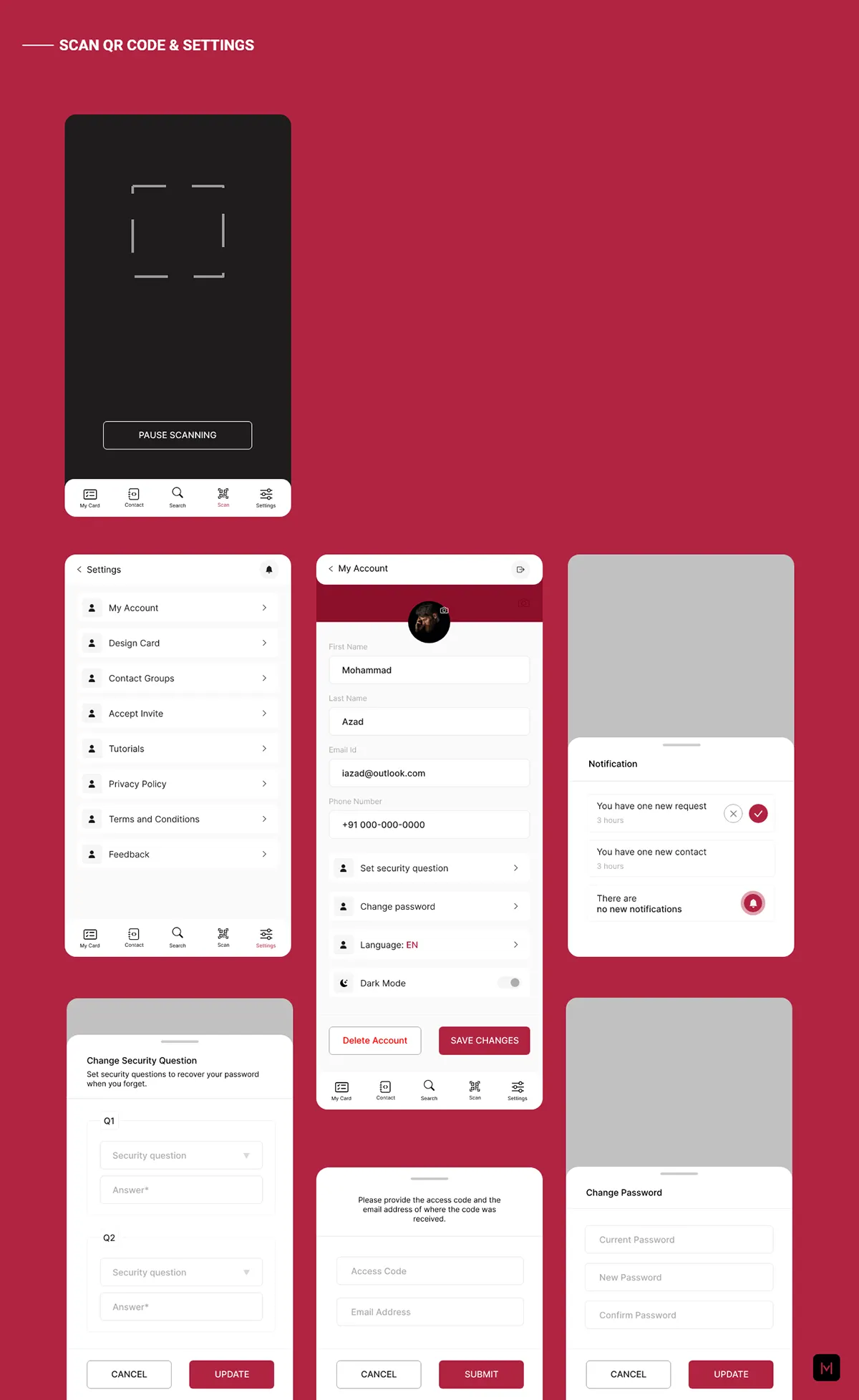
      4. Scan, and settings

        Scan someone’s QR; your account, security questions, password and dark mode.

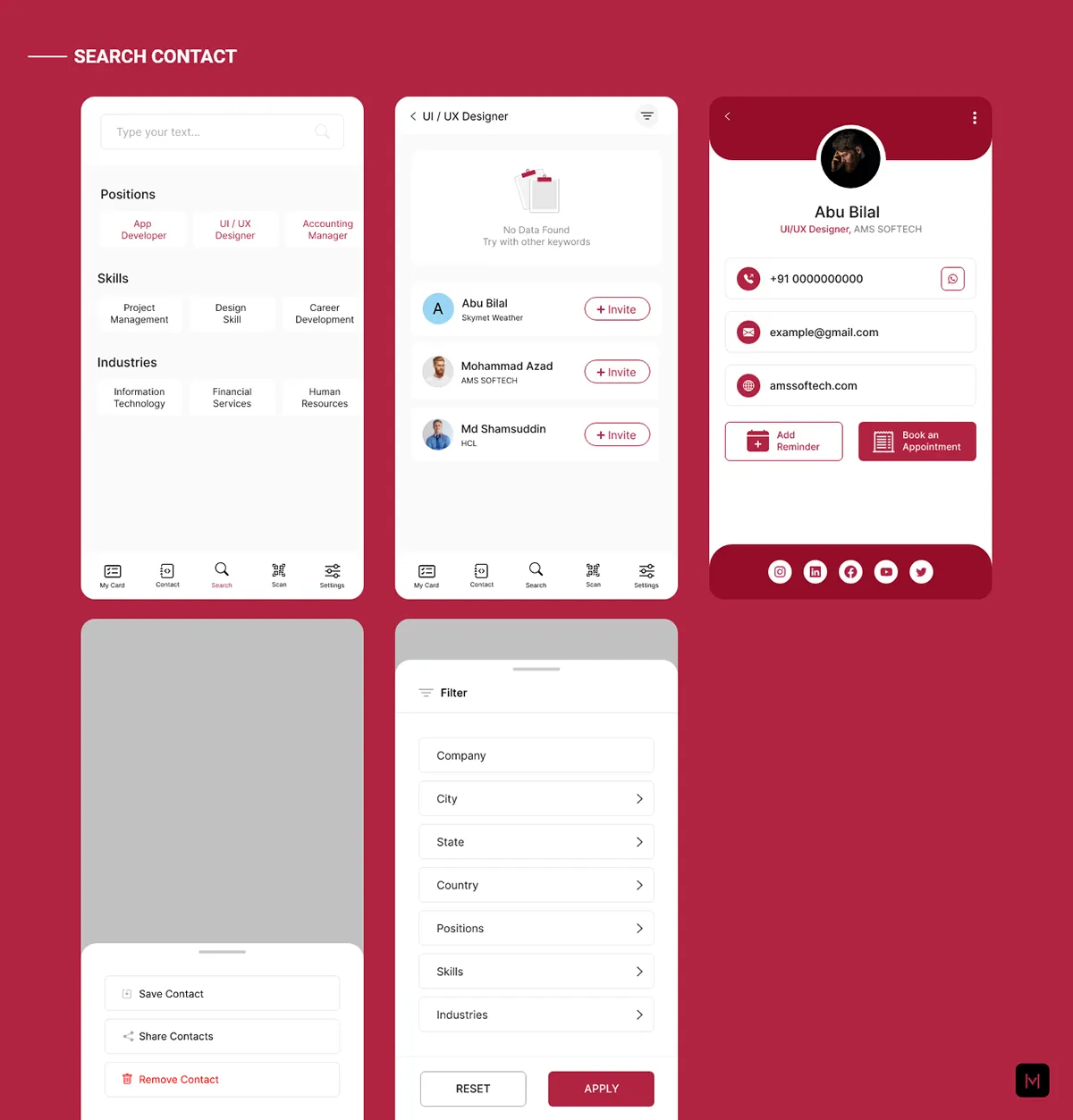
      5. Find anyone

        Search contacts by position, skill or industry, and filter the results.

      6. Contacts and groups

        Add a contact by code, scan or by hand; groups, reminders, import and export.

      01 / 6
      beDigital · Dashboard
      Dashboard screens: my card, view QR, handshake and notifications
      Authentication screens: login, passcode, touch ID, register and security questions
      Design vCard screens: theme, card, details and contact types
      Scan QR code and settings screens
      Search contact screens: categories, results, a contact and filters
      Contact screens: list, adding a contact, reminders, groups and import
      Next

      More company work